
As businesses grow, managing payroll, people data, compliance, and workforce processes becomes harder to do manually. That is often when terms like HRIS, HRMS, and HCM begin appearing in software research, vendor comparisons, and internal discussions.
Although these acronyms are often used interchangeably, they do not always mean the same thing. Understanding the difference matters because the wrong assumption can lead to the wrong technology decision. Businesses may overbuy, underbuy, or choose a platform that does not fit their current needs or future growth.
A clearer understanding of HRIS, HRMS, and HCM helps business owners and HR leaders evaluate solutions with more confidence. It also makes it easier to focus on what the system must actually support, whether that is payroll accuracy, employee recordkeeping, hiring, onboarding, compliance, reporting, or long-term workforce planning.
Content
- The Difference Between HRIS, HRMS, and HCM Matters
- What Is an HRIS?
- HRMS, what it is?
- What Is HCM?
- HRIS vs. HRMS vs. HCM: What Is the Difference?
- Where HRIS, HRMS, and HCM Overlap
- How to Choose the Right HR System for Your Business
- Signs Your Business May Need More Than a Basic HR Platform
- Why Businesses Should Focus on Capabilities, Not Just Acronyms
- Final Takeaway
- Frequently Asked Questions
The Difference Between HRIS, HRMS, and HCM Matters
More than a software decision
For small and mid-sized businesses, HR technology affects more than administration. It shapes payroll accuracy, employee records, hiring consistency, compliance, manager visibility, and the ability to support growth without adding unnecessary strain.
Why the distinction matters
HRIS, HRMS, and HCM may sound interchangeable, but they often reflect different levels of functionality and different approaches to workforce management. Some differences are administrative. Others influence operations, talent strategy, and long-term planning.
What businesses should focus on
Understanding those distinctions helps leaders focus less on terminology and more on business need. Some organizations need better control over employee data, payroll, and core HR tasks. Others need broader support for recruiting, onboarding, performance management, development, and workforce planning.
Choosing the right fit
The right system depends on the complexity of your people processes and the stage of growth your business is in. A better-fit platform can reduce friction, improve consistency, and support smarter workforce decisions over time.

What Is an HRIS?
An HRIS, or Human Resource Information System, is the foundation of digital HR administration. It gives businesses one central place to manage employee information and core HR processes with more accuracy, consistency, and visibility.
Most HRIS platforms help organize payroll data, benefits enrollment, time and attendance records, tax forms, job history, compensation details, and other essential employee information. By replacing spreadsheets, paper files, and disconnected tools, an HRIS reduces manual work and creates a more reliable system of record.
For many growing businesses, an HRIS is the first step toward a more structured HR operation. It supports payroll accuracy, cleaner recordkeeping, and stronger day-to-day compliance without adding unnecessary complexity.
HRIS and what software is it designed to do
HRIS software is primarily designed to manage information. Its strength lies in centralizing HR data and supporting routine administrative functions that businesses need to perform accurately and consistently. It helps create a stable operational base for managing the workforce and can reduce the risk that comes from fragmented or outdated records.
Who HRIS is usually best for
HRIS is often the best fit for businesses that need to strengthen core HR administration before expanding into broader workforce tools. That includes organizations that want better control over employee records, payroll processes, benefits data, and time tracking, but do not yet need more advanced capabilities for talent management or strategic workforce planning.
HRMS, what it is?
A broader workforce management tool
An HRMS, or Human Resource Management System, builds on the core capabilities of an HRIS and extends further into workforce process management. While HRIS usually focuses on employee data and administration, HRMS supports more of the employee lifecycle.
What HRMS may include
HRMS may include recruiting, applicant tracking, onboarding workflows, training administration, performance management, document workflows, policy acknowledgments, and stronger reporting. That added functionality helps businesses create more consistency in how employees are hired, onboarded, managed, and developed.
Why growing businesses need it
Many organizations reach a point where accurate records alone are not enough. They also need repeatable hiring processes, better documentation, more structured onboarding, and stronger manager accountability. HRMS helps close those gaps and gives growing teams the structure they need to scale with confidence.
What Is HCM?
HCM, or Human Capital Management, is the broadest and most strategic of the three terms. While it includes many of the capabilities found in HRIS and HRMS, HCM takes a wider view of the workforce and treats people as a long-term business asset.
In practice, HCM may include talent acquisition, employee development, succession planning, engagement tools, advanced analytics, compensation planning, and workforce planning. Rather than focusing only on administration or process management, HCM connects people strategy to business strategy.
That makes HCM especially valuable for organizations looking beyond efficiency alone. Businesses facing retention challenges, leadership pipeline concerns, skills gaps, or growth-related planning needs often benefit from a stronger HCM approach. Even when a company is not ready for a highly complex platform, the HCM framework can still help leaders think more strategically about how hiring, development, retention, and planning support long-term business performance.
Why HCM is considered more strategic
HCM is considered more strategic because it goes beyond managing current HR tasks and looks at how workforce decisions affect future performance. It encourages organizations to think in terms of retention, development, planning, leadership continuity, and the long-term value of investing in people and processes.
Types of organizations often look for HCM capabilities
HCM capabilities are often most relevant to businesses that have moved beyond foundational HR administration and need deeper support for planning, development, retention, and organizational growth. That can include larger mid-sized companies, multi-location employers, or organizations that are building more intentional talent strategies.
HRIS vs. HRMS vs. HCM: What Is the Difference?
The main difference is scope
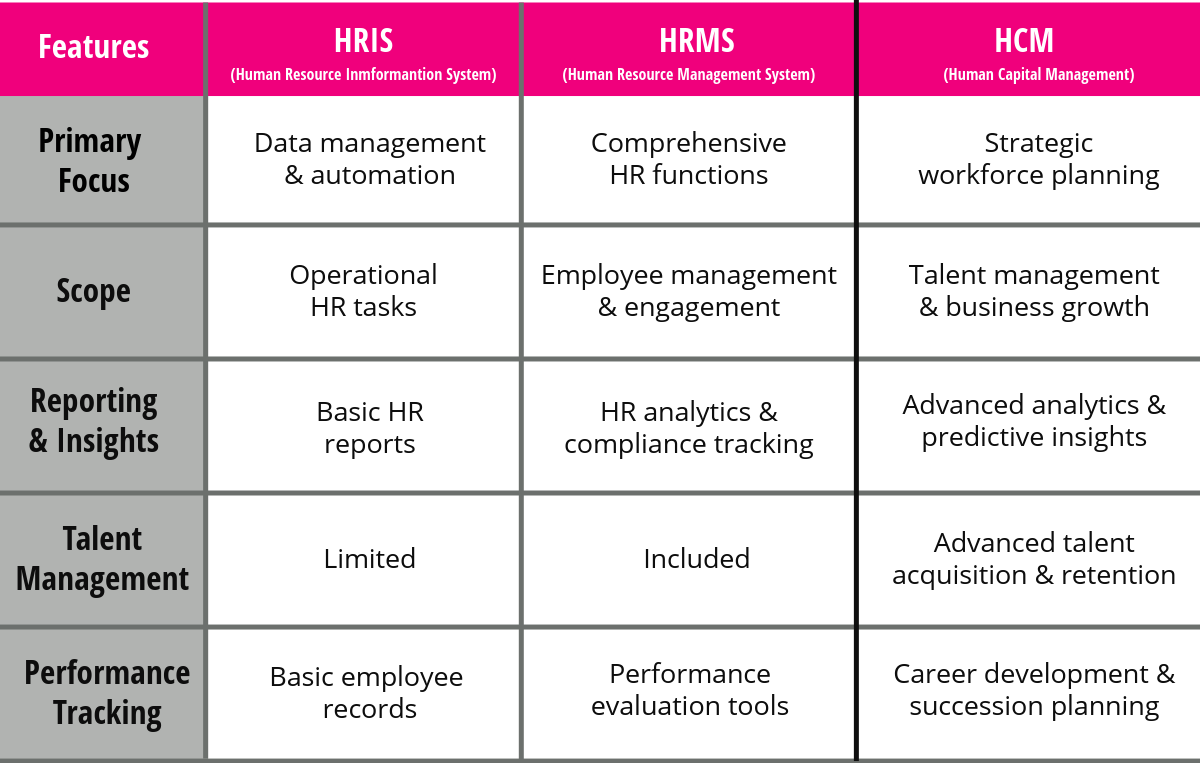
HRIS, HRMS, and HCM usually reflect different levels of HR technology maturity and different business priorities.
How the categories generally differ
HRIS typically focuses on employee information, payroll, benefits, and core HR administration. HRMS builds on that base by supporting more workforce processes across the employee lifecycle. HCM takes the broadest view, with more emphasis on talent, planning, analytics, and long-term workforce strategy.
Why the labels can be misleading
The market does not always apply these terms consistently. That is why businesses should treat them as general guides, not fixed definitions.
A simple way to think about it
HRIS helps manage HR information, HRMS helps manage HR processes, and HCM helps manage the workforce more strategically as the business grows.
Where HRIS, HRMS, and HCM Overlap
One of the biggest reasons this topic creates confusion is that there is significant overlap among all three categories. Many platforms now combine employee data management, payroll, onboarding, reporting, performance tools, and employee self-service in a single system. That means one solution may contain elements commonly associated with HRIS, HRMS, and HCM all at once.
This overlap is not necessarily a problem, but it does mean businesses should be careful not to make decisions based on terminology alone. Two solutions with different labels may offer similar functionality, while two products with the same label may differ substantially in what they actually support.
The more useful approach is to evaluate how well a system addresses your organization’s real needs. Can it centralize data accurately? Can it support payroll and compliance processes? Can it bring consistency to hiring and onboarding? Can it help leaders make better workforce decisions over time? Those questions usually matter more than the acronym attached to the software.
How to Choose the Right HR System for Your Business
Start with your current reality
Choosing the right HR system starts with understanding your current HR operations. For many businesses, the issue is not a lack of software but a lack of structure, visibility, consistency, or scalability.
Match the system to the need
If your main challenges involve employee records, payroll, time tracking, and basic HR organization, an HRIS may be enough. If your needs include recruiting, onboarding, performance, and broader employee lifecycle management, an HRMS may be the better fit. If leadership needs stronger support for retention, development, succession, analytics, and workforce planning, HCM capabilities may be more relevant.
Focus on fit, not labels
The best choice supports current operations while leaving room for growth. Before comparing vendors, ask whether your records are accurate, payroll is connected, onboarding is consistent, compliance is tracked, and leaders have enough visibility. Those answers matter more than the label on the platform.
Signs Your Business May Need More Than a Basic HR Platform
Many businesses do not realize they have outgrown their current HR tools until process gaps start disrupting daily operations. Payroll questions may increase, employee information may sit in multiple places, onboarding may vary by manager, reporting may feel limited, and compliance tracking may become too manual to manage efficiently.
These issues often signal that a foundational administrative system is no longer enough. As workforce complexity grows, businesses usually need stronger process support, better visibility, and more consistent workflows. That may mean moving beyond a basic HRIS, expanding into broader HRMS functionality, or adopting capabilities that align more closely with HCM.
The key is recognizing that HR technology should evolve with the business. A system that worked well at one stage of growth can create friction at the next if it no longer supports the way the organization operates. The right platform should reduce complexity, improve consistency, and give leaders the tools they need to manage growth with more confidence.
Why Businesses Should Focus on Capabilities, Not Just Acronyms
One of the most practical lessons in this discussion is that software terminology only tells part of the story. In real-world buying decisions, what matters most is what the platform actually helps your business do. A strong solution should reduce manual work, improve data accuracy, support compliance, create more consistent people processes, and give leaders better visibility for decision-making.
For that reason, businesses should evaluate capabilities before categories. Instead of starting with the question, “Do we need HRIS, HRMS, or HCM?” it is often more useful to ask, “What processes are breaking down, where are we exposed to risk, and what support will help us operate more effectively as we grow?”
That shift usually leads to a better decision because it focuses attention on operational fit rather than labels. It also helps leaders view HR technology as part of a broader people and business strategy, not just another software purchase

Final Takeaway
What the terms really mean
HRIS, HRMS, and HCM are closely related, but they are not the same. HRIS usually refers to foundational HR information and administration, HRMS reflects broader workforce process management, and HCM points to a more strategic approach to talent and long-term workforce planning.
What the right choice depends on
For small and mid-sized businesses, the best decision is not about choosing the most advanced acronym. It is about identifying where current HR processes create inefficiency, inconsistency, or risk and selecting technology that supports the business at its current stage while leaving room to grow.
Why that approach matters
When businesses make decisions this way, they are more likely to improve payroll accuracy, strengthen administration, support compliance, and create a better employee experience over time. Organizations that want a closer look at HR process maturity may benefit from practical HR resources or an HR Risk Assessment.
Choosing a system that supports growth
The best HR technology should fit the way your business operates today while giving your team the support, visibility, and flexibility to grow with confidence.
See how the right payroll and HRIS foundation can help reduce manual work, improve visibility, and support a growing workforce.
Frequently Asked Questions
What is the main difference between HRIS, HRMS, and HCM?
The main difference is scope. HRIS usually focuses on employee data, payroll, benefits, and core HR administration. HRMS typically includes those functions plus broader workforce tools such as recruiting, onboarding, training, and performance management. HCM is generally the most strategic, with more emphasis on talent development, workforce planning, analytics, and long-term people strategy.
Is HRIS the same as HRMS?
Not exactly. The terms are often used interchangeably, but HRIS usually refers to foundational HR software that manages employee information and administrative tasks. HRMS generally builds on that base by adding more robust workforce management features that support the employee lifecycle.
Which is better for a small business: HRIS, HRMS, or HCM?
For many small businesses, HRIS is the best starting point because it helps centralize employee records, payroll, and basic HR administration. HRMS may be more appropriate when hiring, onboarding, and performance processes become more complex. HCM is often most useful when the business is thinking more strategically about retention, development, and workforce planning.
Do HRIS, HRMS, and HCM all include payroll?
Many modern platforms include payroll, but not all do so in the same way. Some include payroll as a core feature, while others rely on integrations or optional add-ons. That is why businesses should review actual capabilities rather than assume payroll is included based on the platform label alone.
When should a company move from HRIS to HRMS or HCM?
A company may need to move beyond a basic HRIS when its workforce processes become more complex. Common signs include inconsistent onboarding, limited reporting, growing compliance demands, performance management challenges, or a need for stronger workforce planning and visibility.
Can one platform include HRIS, HRMS, and HCM features?
Yes. Many modern HR technology platforms combine capabilities associated with all three categories. A business may use one system for employee records, payroll, and timekeeping while also using it for recruiting, training, analytics, and talent management as needs evolve.
How do I choose the right HR software for my business?
Start by identifying your biggest HR and workforce challenges. If your needs are mainly administrative, an HRIS may be enough. If you need stronger support for hiring, onboarding, development, and performance, an HRMS may be a better fit. If your focus is broader workforce strategy, retention, and planning, HCM capabilities may be more appropriate.
HRIS, HRMS, or HCM: Is Your HR Setup Putting You at Risk?
Understanding HRIS, HRMS, and HCM is one thing. Knowing whether your current HR and payroll processes are creating risk is another. Take our HR Risk Assessment to uncover gaps in compliance, payroll, onboarding, and employee management before they become bigger problems.
Take the HR Risk Assessment →If you need help with workforce management, please contact PeopleWorX at 240-699-0060 | 1-888-929-2729 or email us at HR@peopleworx.io
Talk to an HR Advisor
Technology can solve part of the problem, but process gaps often need expert HR guidance. If you are unsure where your biggest risks or breakdowns are, start there. Get HR guidance before it goes wrong